
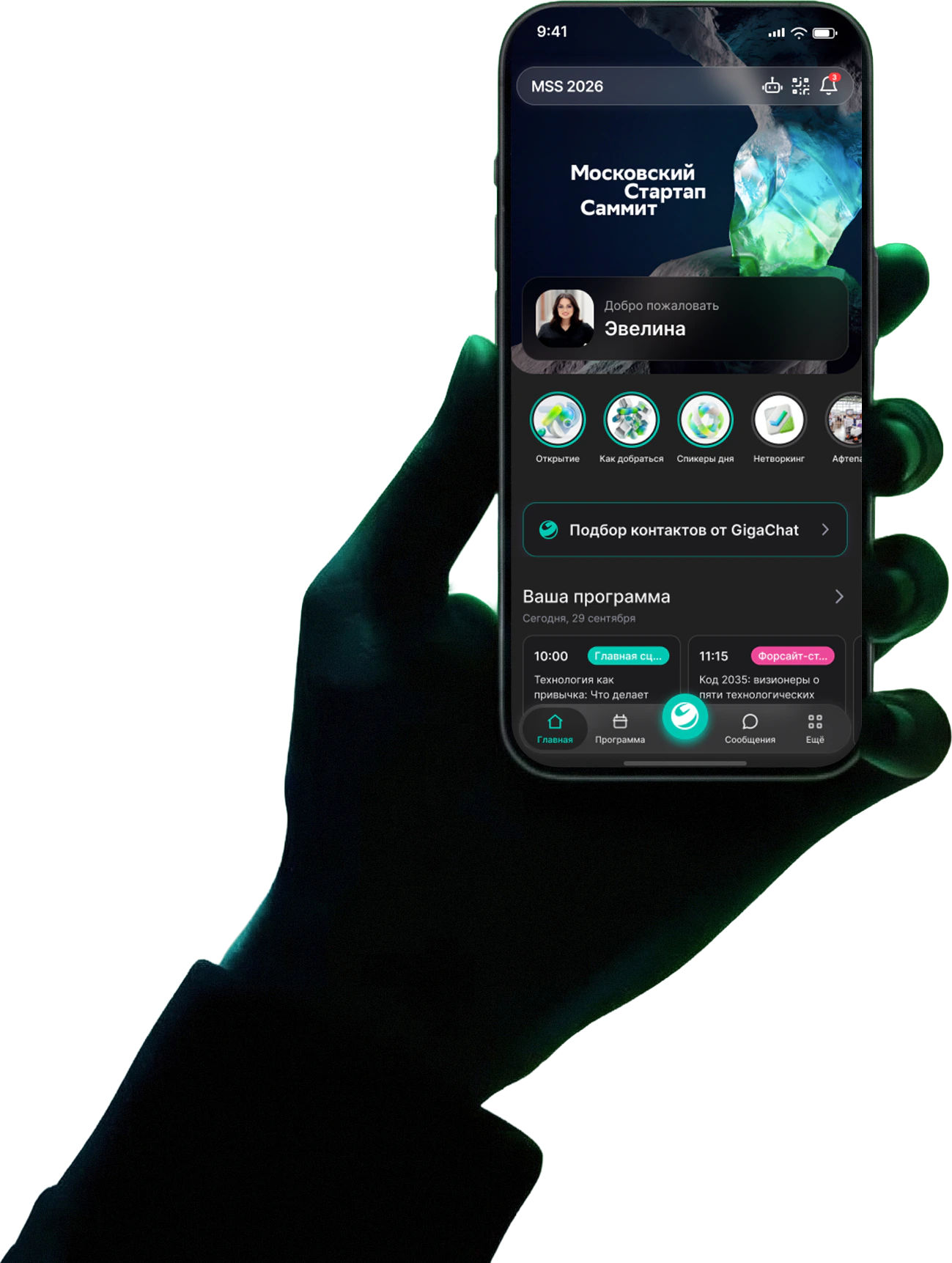
The Summer School app under the ICLRC brand on the Ewento platform: 246 attendance check-ins over ten class days — no desk, no lists, no staff on duty. Three features were built specifically for the school.
The Summer School on Public International Law isn’t a two-day conference — it’s ten consecutive class days in one building. Twenty-nine students, nine lecturers from seven countries, lectures from half past nine in the morning and a general course that runs through the whole school.
An app for this format solves different problems than it does at a summit for thousands. Nobody needs help finding people to meet — everyone knows each other by the end of week one. But every morning the organizers need to know exactly who came, and the schedule on the screen in the hall has to match what is actually happening.
If you came to the lecture, you opened the app. We made that the only thing a student has to do.
For ICLRC we released the Summer School app under the school’s brand on the Ewento platform — and added three capabilities the platform didn’t have before this project: attendance check-in by scanning a QR code on a screen that changes every half-minute, a schedule on venue screens that updates itself, and a printed programme generated from the same dashboard.
What the school brought us after the 2025 season
Attendance — every day, ten days in a row
Who showed up has to be known every morning. Checking people in at the door means an organizer on duty, a queue at the desk and a list someone reconciles by hand afterwards.
The screen schedule was laid out by hand
In 2025 it was a 14-slide presentation, one slide per day. Any rescheduled lecture meant re-laying out the slide and updating the file on every screen.
Last year’s app was a generic one
The school already used an event app — but with an “Event Title” placeholder on the home screen and none of ICLRC’s branding.
Surveys and sign-ups lived in separate files
Course feedback was collected in a document, excursion sign-ups in a spreadsheet. None of it was linked to the participant list.
One app instead of a pass, slides and spreadsheets
ICLRC — the International and Comparative Law Research Center — has run the Summer School every year since 2015. The 2026 theme was “BRICS and International Law”: a general course by a University of Brasilia professor, lectures on the approaches of Egypt, South Africa, India, Indonesia, China and Russia, and a guest lecture by Russia’s BRICS Sous-Sherpa. The school is taught in English.
The contract was signed on July 1. Branding, the agenda, speakers, news and activities came together in July; on August 7 participants received their access codes and started logging in. But the key part happened in the project’s first week: on July 6 and 7 the platform gained rotating-QR check-in and schedule screens, and on August 10, the first class day, a printable programme. Every event on Ewento has had all of it since.
- July 1 · contract
- July 6–7 · check-in and screens shipped
- July 21 · the “library” point and the venue screen
- August 7 · first logins
- August 10 · printable programme
- August 10–21 · 10 class days
- 29studentsout of 64 registrations; organizers and speakers are counted separately
- 35lectures and seminars
- 9lecturers from seven countries
- 10consecutive class days
A QR code at the door that can’t be forwarded
At the entrance to the ICLRC library stood a screen with a QR code. A student opened the app, pointed the camera at it — and a second later saw “You’re checked in!”, while the organizers saw their name in today’s list in the dashboard. No desk, no staff member, no paper list: participants check themselves in, and it is the only way to check in.
Summer School on Public International Law
Library
Scan the QR code in the app to check in
The code refreshes automatically
Scanner
Point the camera at the code on the screen
- 1The screen computes the code itselfThe code is a signature of the point and the current 30-second window. The screen and the server compute it independently; nothing is written to the database when it changes.
- 2A photo of the code is useless a minute laterThe server accepts only the current and the previous window. You can’t check in from home with a forwarded screenshot.
- 3Any screen, in a minuteA point is a secret link from the dashboard. A TV, a laptop or a tablet with a browser — and the door is open.
Checked in out of 29 — by class day, August
85%average attendance
- 2410
- 2411
- 2612
- 2613
- 2214
- 2517
- 2518
- 2319
- 2620
- 2521
246 check-ins out of 290 possible (29 students × 10 days). Among those who came at least once — 91%. The fullest days were Wednesday the 12th, Thursday the 13th and Thursday the 20th: 26 people each.
Why the code rotates
A static QR on the door is a pass that can be photographed and shared in the group chat. So the code on the screen lives for half a minute: it is derived from the point’s secret and the number of the current window, and on verification the server accepts only that window and the previous one — enough slack to take out a phone and aim the camera. No database write is needed when the code changes: the screen and the server compute it independently.
What ten days produced
- 29students in the group
- 27logged in with their code
- 246check-ins over 10 class days
- 19checked in all 10 days
- 56%of check-ins between 9:00 and 10:00
- 85%average attendance
Lectures started at 9:30 — more than half of the check-ins fall in the hour before them. All 246 check-ins were made by the students themselves from the app; 14 test check-ins by organizers before the school started are not counted.
The app became the pass. It is the most reliable trace of daily use: nobody has to be asked to open it — they open it to get in.
A schedule on the screen that updates itself
The second screen at the venue showed the day’s schedule: what’s on now, what’s next, who is lecturing. It’s an ordinary browser tab on a TV with a secret link from the dashboard — the same kind as the check-in point. Every 20 seconds it asks the server whether anything changed and redraws the board. Move a lecture in the dashboard — 20 seconds later the hall sees it.
Summer School on Public International Law
Programme
Monday, 10 August
13:24
- 09:00 – 09:25Morning Coffee Break
- 09:30 – 10:30General Course of Public International LawLecturer
- 10:30 – 10:50Coffee Break
- 10:50 – 11:50General Course of Public International LawLecturer
- 11:50 – 13:20Lunch Break
- 13:20 – 14:20Egypt’s Approaches to International LawNowLecturer
- 14:20 – 14:40Coffee Break
- 14:40 – 15:40South Africa’s Approaches to International LawNextLecturer
Dashboard → Agenda
Egypt’s Approaches to International Law
Lecturer
- 1One link in the TV’s browserThe screen is configured in the dashboard: the whole day or one hall, light or dark theme, language, rotation for vertical panels.
- 2“Now” and “Next” by the server clockThe board doesn’t trust the TV’s clock: time comes from the server, and the badges move on to the next lecture by themselves.
- 3Never reloads itselfNobody is standing next to the TV. If the connection drops or the server is being updated, the screen keeps the last schedule and only shows a small status chip.
- 2025: a 14-slide presentation, one slide per day2026: one link open in the TV’s browser
- A rescheduled lecture — re-lay out the slide and update the file on the screenA rescheduled lecture — an edit in the dashboard, on screen in 20 seconds
- The screen doesn’t know what’s on now“Now” and “Next” move on by themselves, by server time
The same schedule — in the phone
The screen in the hall and the agenda in the app are the same schedule from the same dashboard: 35 lectures and seminars, 9 lecturers, coffee breaks and lunches. Students saved sessions to favorites 34 times — most often the general course, with its 12 lectures over two weeks.
The schedule screen in the hall: the same programme as in the phone and on paper.
A printed programme that builds itself
A school needs the paper programme as much as the screen: a sheet at the desk, an insert in each student’s folder, the timetable by the lecture-room door. Before this project it was laid out separately — and every edit in the app meant one more edit in the file. On August 10, the first class day, the organizer dashboard gained a “Print” tab: the same programme as in the phone and on the TV, laid out on A4 sheets — one day per sheet — and sent to the printer straight from the browser.
Agenda → Print · permanent link
ewento.ru/pp/Program-summer2026.pdf
Version 1Update automatically
- 09:0009:25Morning Coffee Break
- 09:3010:30General Course of Public International LawLecturer
- 10:3010:50Coffee Break
- 10:5011:50General Course of Public International LawLecturer
- 11:5013:20Lunch Break
- 13:2014:20Egypt’s Approaches to International LawLecturer
- 14:2014:40Coffee Break
- 14:4015:40South Africa’s Approaches to International LawLecturer
- 1One day — one sheetAn A4 sheet with the event header; a day that doesn’t fit continues on the next sheet with the same header. Speakers and rooms can be hidden, ink can be saved.
- 2The link stays, the file changesOne address goes on the poster and into the QR. Behind it — a file on the CDN, every version under its own name: no cache to purge.
- 3Rebuilds itselfThree minutes after the last edit the file is rebuilt — including when a session was deleted. An edition that must stay as printed has a switch.
The point isn’t the paper — it’s that the programme now lives in one place. The student’s phone, the TV in the hall and the sheet at the desk are all built from one organizer dashboard: a rescheduled lecture is entered once, not three times. For a school team of a few people that matters more than any feature list.
Not just a pass
Checking in is the reason to open the app, but the rest of the school day ran inside it too: the agenda and speakers, organizers’ news, sign-ups for the quiz show and the boat trip, direct messages and a chat with the organizers, the “Surveys” page. Students spent the most time in Networking — 73 minutes in total; the home screen came second, the agenda third.
Two weeks in pictures
Lectures, seminars, the boat trip and “Hitomania” — photos by the school’s organizers.
What else the school app included
- 09:30
General Course of Public International Law
Library
13:20Egypt’s Approaches to International Law
Library
14:40South Africa’s Approaches to International Law
Library
In 10 minutes: General Course of Public International LawAgenda and favorites
35 lectures and seminars over two weeks, reminders before each one
When is tomorrow’s general course lecture?
Tomorrow at 09:30, the general course. Here is the session:
General Course of Public International Law
09:30 · Library
AI assistant
Answers questions about the school’s agenda and shows session cards
Welcome to the Summer School
The agenda, speakers and map are in the app
Surveys
Tell us how the school went
Push notifications
8 campaigns, 232 deliveries, 53% read
Radisson boat cruise · August 17, 19:00
Sign upActivity sign-ups
The “Hitomania” quiz show — 22 of 29, the boat cruise — 24 of 29
- LibraryEntranceCoffeeYou are here
Map and “About ICLRC”
How to get to the Center, where the library is, a page about the Center
Where do we meet for the boat?
At the Center entrance at 18:30
Messages
56 messages from students and 72 from organizers, 30 reactions
How was the general course?
Surveys
A “Surveys” page in the app instead of documents and forms
- ПрограммаСпикерыУчастники
In the school’s language
The school is in English; nine students switched the interface by hand — their phones were in Russian
What the report showed
After the school, ICLRC received an analytics report: logins, devices, daily check-ins, sections, messages, campaigns and returns to the app after the end. The headline numbers:
- 246attendance check-ins over 10 days
- 85%average attendance
- 27 of 29students logged into the app
- 13came back to the app after the school
10 class days · 35 lectures and seminars · 9 lecturers · 8 campaigns
What we learned
Ten class days are not two summit days. Here the app wins not by the number of sections but by removing the same morning chore every day: record who came and show what’s on now. That is why QR check-in and the schedule screen worked every single day, not just on opening day — and by the end of week two the app was opened out of habit, like a pass.
The second lesson: at a small school everything has to live in one place. Attendance, the student’s phone, the TV in the hall and the sheet at the desk are all run from one dashboard, and a team of a few people never has to reconcile anything by hand. The three features built for the school stayed in the platform and have since been available to any event on Ewento with one switch in the organizer dashboard.
What we’re building next
Check-in at the desk
The reverse flow: a staff member scans the participant’s QR — for badge pick-up and for anyone whose phone died. The server side already exists.
Presence without scanning
Bluetooth beacons in the rooms: the app registers that a participant is at the venue — no QR, no action on their part.
Lecture materials in the assistant
The school’s library — texts, cases, recommended reading — in the assistant’s knowledge base, so it can answer more than schedule questions.
Figures are from the analytics report prepared for ICLRC in September 2026; attendance is based on students’ check-ins in the app over the ten class days, August 10–21.